Custom web applications
Booking, records, orders, attendance or a client portal — a tool that does exactly what your company needs. It runs in the browser, so you open it on a computer or phone with nothing to install.
When a web application makes sense
When a company works with data that today gets lost in spreadsheets, emails and paper.
Excel is no longer enough
Your data lives in spreadsheets you email around, and nobody knows which version is current.
Booking and orders
Customers want to book online and you want a clear calendar with no double bookings.
Records and attendance
Members, employees, jobs or machines — all in one place, with history and search.
Client portal
Customers log in and see their orders, documents or invoices instead of calling.
What the application can do
Analysis of your process
Before I write any code, we go through how you work today. The application should adapt to you, not the other way round.
Accounts and permissions
Logins for staff and customers and roles (say, administrator and mechanic) — everyone sees only what they need.
Documents and PDFs
Invoices, confirmations, vouchers or reports generated automatically, including QR payments.
Calendars and booking
Free slots based on working hours, overlap checks and email confirmations.
Integration with other systems
Connections to accounting, email, payments or the spreadsheets you already use.
Security and backups
Hashed passwords, protected forms, permissions and regular data backups.
Try an application yourself
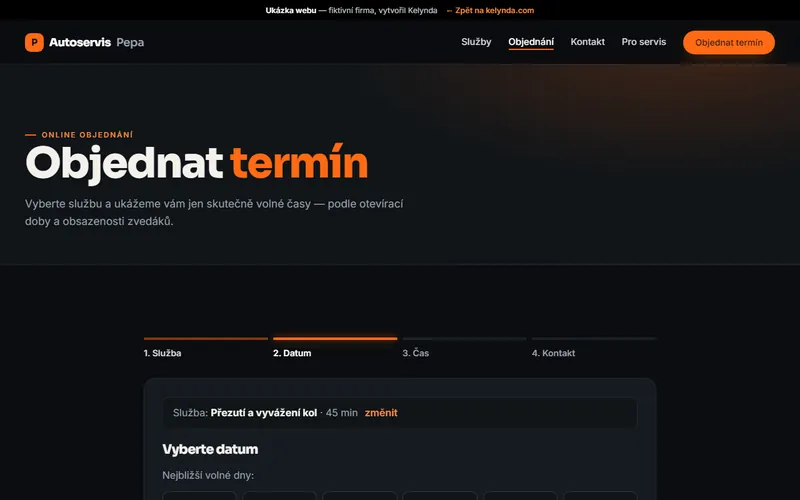
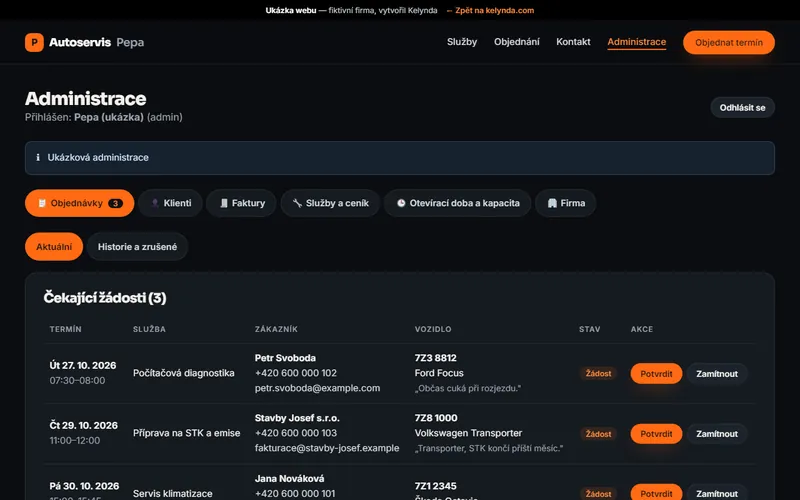
The demo sites run real applications with an admin (log in with demo / demo). The data resets every day, so you can try anything.
- Autoservis Pepa — appointment booking, admin and PDF invoices with QR payment
- Salónek u Petry — booking with a specific hairdresser, daily calendar and gift vouchers
- Pražírna u Kamila — orders, stock and a roasting plan
- Real reference: Fencing Club Zlín — member records and attendance
How an application is built
Analysis
We go through the process, the data and the people who will use the application. The result is a specification with a fixed price.
Prototype
A clickable first version of the main screens, tested with the people who will work with it.
Build in stages
The most important features come first and I show them as I go, so you can start using the application early.
Launch and operation
Data migration, training, hosting and backups. Then support and further development based on real use.
How much a web application costs
Every application is different, so I set the price after the initial analysis — fixed, for a specific scope.
Larger projects are split into stages: you can use the first part sooner and pay as you go.
- number of screens and user types
- integration with other systems
- migrating existing data
- security and performance requirements
- ongoing maintenance and development
What people ask
A website mainly informs. A web application works with data: users log in, enter information and the system calculates, monitors and generates documents.
No. It runs in the browser on a computer, tablet or phone. If you need to work offline or connect devices, a desktop application is a better fit.
You do. The data is stored on the hosting or server of your choice. We agree the terms for handing over the source code in the contract up front.
Passwords are hashed, forms are protected against abuse, every user sees only what they have permission for, and the data is backed up regularly.
Yes, I build it to be extended. New features are added based on what real use shows.
Is a process slowing you down?
Tell me how you do it today and what annoys you about it. I will suggest how an application could solve it — the consultation is free.
Free consultation